> For the complete documentation index, see [llms.txt](https://xave-finance.gitbook.io/general/llms.txt). Markdown versions of documentation pages are available by appending `.md` to page URLs; this page is available as [Markdown](https://xave-finance.gitbook.io/general/guides/how-to-swap.md).
# How to Swap
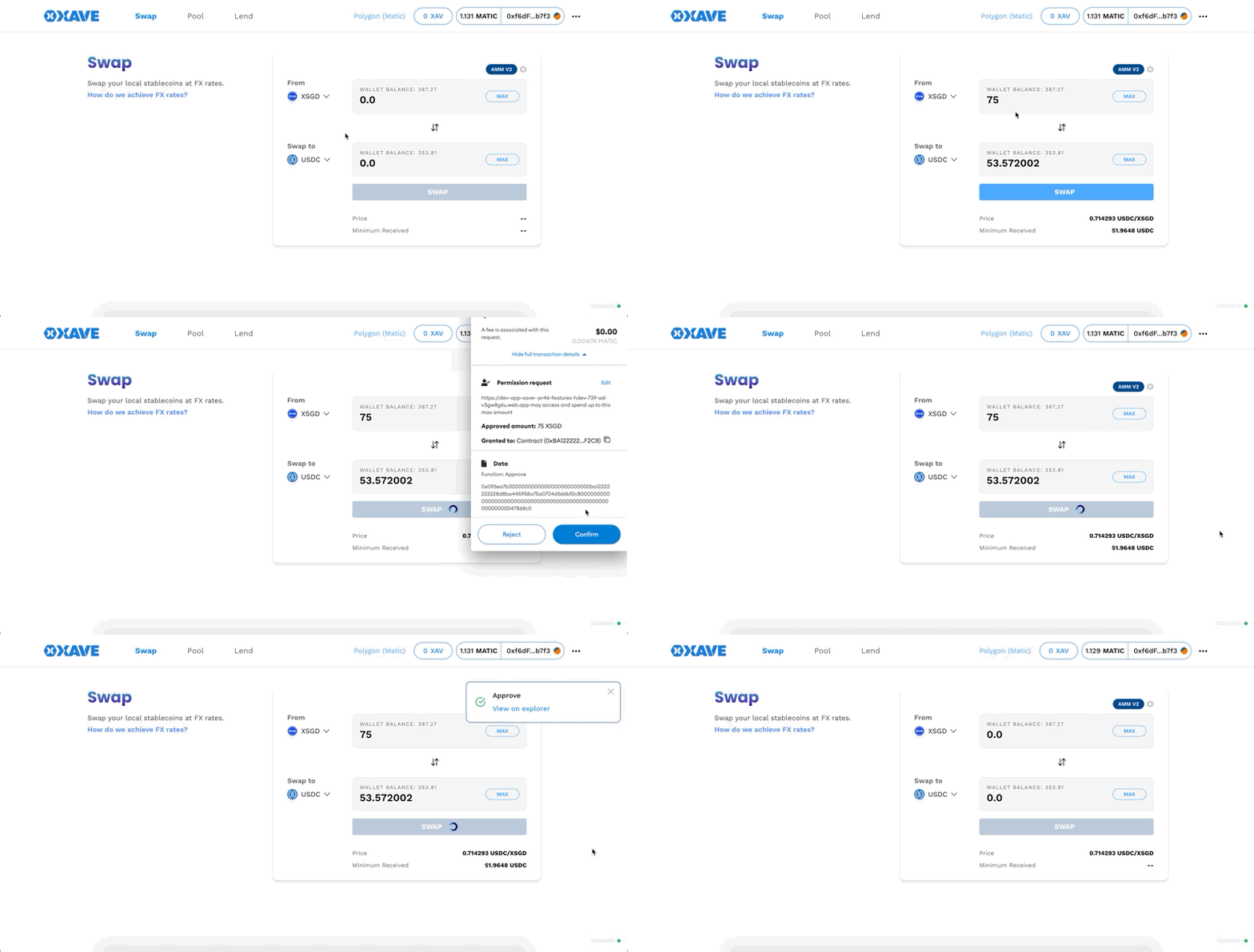
1. Click this link to go to the AMM page.
2. Select the asset you wish to swap "from", select the asset you wish to swap "to".
3. Enter the amount on the “swap from” input box, you will notice that amount is automatically calculated on the “swap to” input box.
4. Click “Approve” and approve the transaction on your connected wallet
5. Double-check your transaction details, click “Swap”.
6. Confirmation modal with details will pop up, Click “Confirm Swap”
{% hint style="info" %}
Optionally, you can click the settings button to adjust the slippage and deadline.
{% endhint %}