# How to Test PHPT:USDC on Sepolia Testnet

#### Token Addresses

<table><thead><tr><th width="226">Token Name</th><th>Address</th></tr></thead><tbody><tr><td>USDC</td><td><a href="https://sepolia.etherscan.io/address/0xb9f4e777491bb848578b6fba5c8a744a40d11128">https://sepolia.etherscan.io/address/0xb9f4e777491bb848578b6fba5c8a744a40d11128</a></td></tr><tr><td>PHPT</td><td><a href="https://sepolia.etherscan.io/address/0x395c430e7aec9216a5CAa2620b164DF381f53D8F">https://sepolia.etherscan.io/address/0x395c430e7aec9216a5CAa2620b164DF381f53D8F</a></td></tr><tr><td>XSGD</td><td><a href="https://sepolia.etherscan.io/address/0x29388a985C5904BFa13524f8c3Cb8bC10A02864C">https://sepolia.etherscan.io/address/0x29388a985C5904BFa13524f8c3Cb8bC10A02864C</a></td></tr></tbody></table>

### Prerequisites

**First, be sure to install** [**https://metamask.io/**](https://metamask.io/)

{% hint style="info" %}
These are the steps required before you can test the PHPT-USDC or XSGD-USDC FX pools. Optionally, you can reach out to our team to send the tokens needed to your address.&#x20;
{% endhint %}

**Add Sepolia to your Metamask**

By default, testnets are not shown in Metamask.&#x20;

1. Open Metamask from your browser
2. Click the network dropdown&#x20;
3. On the "Select a network" modal, make sure that "Show test networks" is switched on
4. Select Sepolia from the network list.&#x20;
5. You will be connected to the Sepolia network.

![](/files/DGKdhlk6Dlz3XAO5pjY1)

\
**Test ETH tokens**

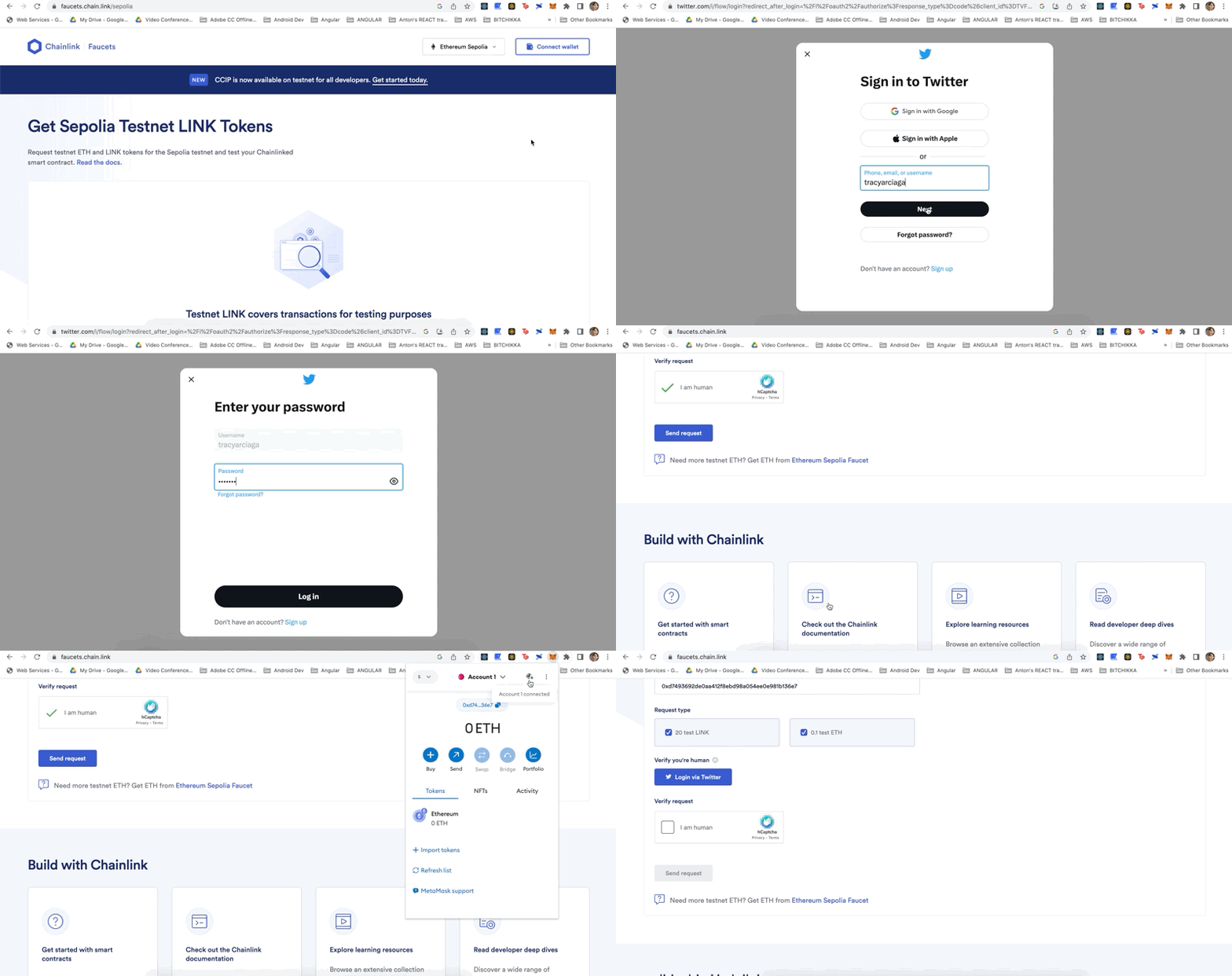
You'll need test ETH tokens to cover for gas fees. You can acquire test ETH from any Sepolia faucet, and for this tutorial we'll use Chainlink's Sepolia faucet(<https://faucets.chain.link/sepolia>)

<figure><img src="/files/OvA7jFcwVWOfhgzTnvpe" alt=""><figcaption></figcaption></figure>

1. Click "Connect Wallet" to connect your Metamask wallet&#x20;
2. Input your wallet address
3. Make sure that "0.1 Test ETH" box is checked
4. You may be asked to login to "Twitter" (for verification purposes), input your Twitter username and password
5. Check "I am human" to verify the captcha&#x20;
6. Click "Send request"&#x20;
7. Check the ETH balance in your wallet.&#x20;

**Issue some FX Pool mock tokens**

You'll need to issue PHPT and USDC in order to add liquidity:&#x20;

<figure><img src="/files/J7gvmM8U67VfVan4sOo4" alt=""><figcaption></figcaption></figure>

1. Go to [https://dev.app.xave.co](https://dev.app.xave.co/#/erc20)
2. Click "Connect wallet" to connect your Metamask wallet &#x20;
3. Click "Issue" from the main menu to go to issue page
4. Switch to "Sepolia" network
5. Select a token to issue (PHPT, USDC)
6. On the "Issue" section, input the amount to mint
7. Click "Issue" button
8. Confirm the transaction from your Metamask

{% hint style="info" %}
On some occasions, you may want to transfer or redeem mock tokens.&#x20;
{% endhint %}

**Transfer mock tokens**<br>

<figure><img src="/files/jExs1hZDfhZeSW6eLDSH" alt=""><figcaption></figcaption></figure>

1. Go to [https://dev.app.xave.co](https://dev.app.xave.co/#/erc20)
2. Click "Connect wallet" to connect your Metamask wallet &#x20;
3. Click "Issue" from the main menu to go to issue page
4. Switch to "Sepolia" network
5. Select a token to transfer (PHPT, USDC)
6. On the "Transfer" section, input the amount to transfer and the address of the recipient
7. Click "Transfer" button
8. Confirm the transaction from your Metamask

**Redeem mock tokens**

<figure><img src="/files/F6WX5OJRwu2A7hfIJJSM" alt=""><figcaption></figcaption></figure>

1. Go to [https://dev.app.xave.co](https://dev.app.xave.co/#/erc20)
2. Click "Connect wallet" to connect your Metamask wallet &#x20;
3. Click "Issue" from the main menu to go to issue page
4. Switch to "Sepolia" network
5. Select a token to mint (PHPT, USDC)
6. On the "Redeem" section, input the amount to redeem
7. Click "Redeem" button
8. Confirm the transaction from your Metamask

### Add Liquidity and Swap

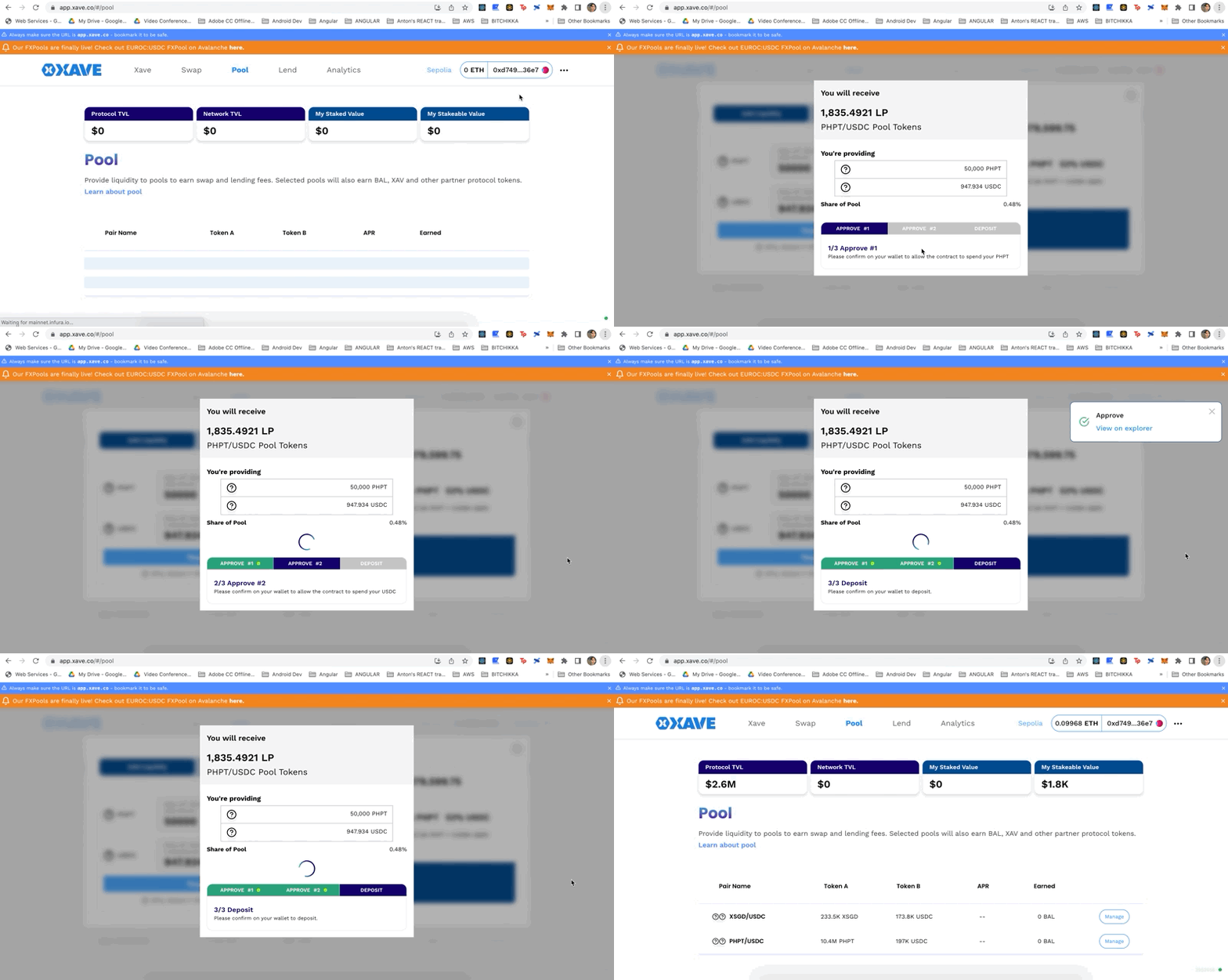
Now you are ready to test any of the FXPools by adding liquidity and swapping tokens. On this tutorial, we will test adding liquidity to the PHPT-USDC pool and swapping PHPT to XSGD.&#x20;

\
**Add Liquidity**

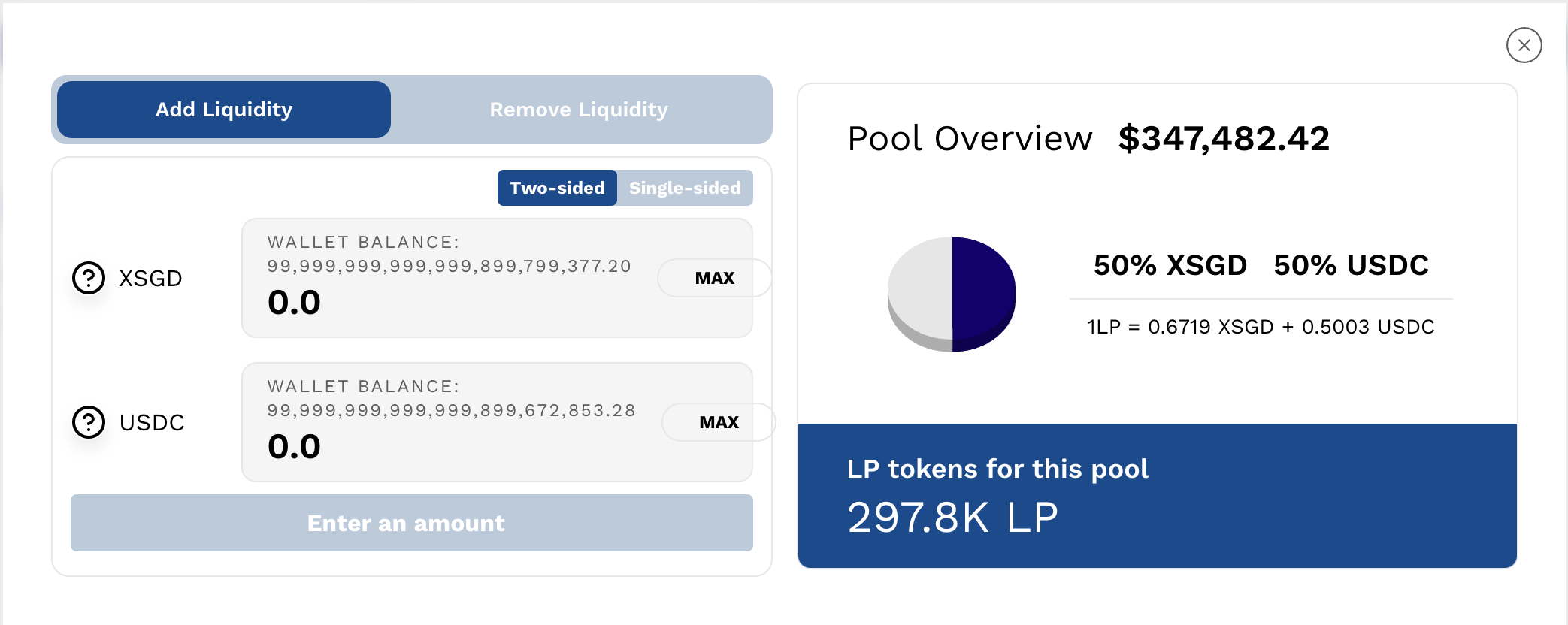
Add liquidity to the PHPT-USDC pool using "two-sided" deposit. &#x20;

<figure><img src="/files/x8pfcOb3tPq3F3F6kIxB" alt=""><figcaption></figcaption></figure>

1. Go to the [pool page](https://app.xave.co/#/pool)
2. Use the network switcher on the upper right portion of the site to connect to "Sepolia"
3. Select PHPT/USDC pool and click Manage
4. Select the Add Liquidity tab
5. Take note - this screenshot illustrates adding liquidity at the 50:50 LP ratio (that looks like the FX rate), however please note that this ratio may change. <br>

   <figure><img src="/files/Prxapym8uWOQyynTzeZt" alt=""><figcaption></figcaption></figure>
6. Enter the amount of liquidity you’d like to provide and choose the amount of slippage tolerance
7. Click "Supply" button
8. Add Liquidity Details window will pop up, click "Confirm Supply"&#x20;
9. Confirm the transactions from Metamask

**Swap**

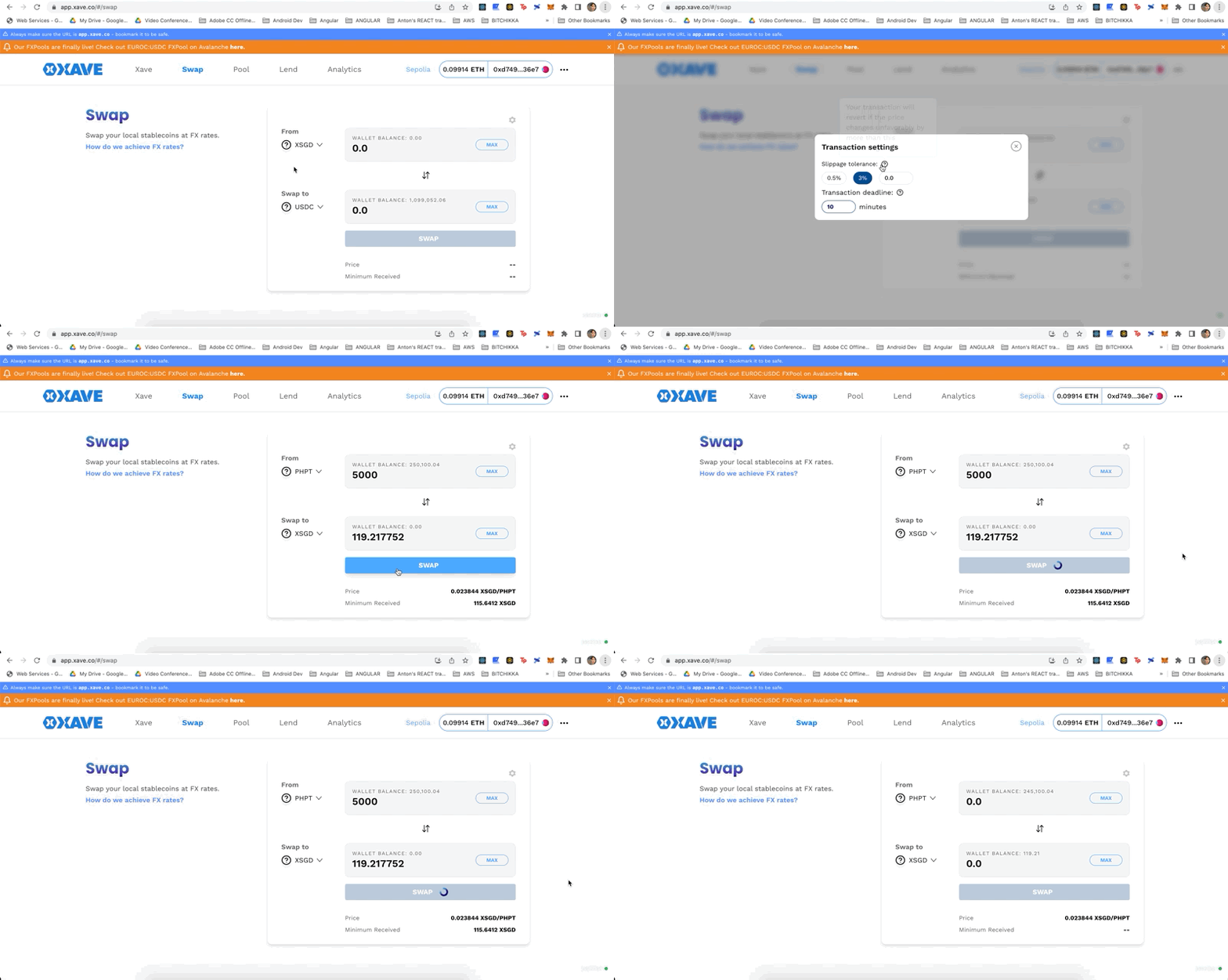
Swap PHPT to XSGD.

<figure><img src="/files/VV4CLaIwuiT0K6yrJbzd" alt=""><figcaption></figcaption></figure>

1. Go to the [swap page](https://app.xave.co/#/swap)
2. Use the network switcher on the upper right portion of the site to connect to "Sepolia"
3. Select "PHPT" from the "from" token
4. Select "XSGD" from the "to" token
5. Input the swap amount
6. Click "swap" button
7. Confirm the transaction from Metamask.

{% hint style="info" %}
You can click on the cog icon to open the "Transaction Settings" window to set Slippage Tolerance and Transaction Deadline settings.&#x20;

Slippage tolerance - the transaction will not go through if the price changes more than the value selected.

Transaction deadline - the transaction will not go through if the transaction has been pending for more than the period specified (in minutes).
{% endhint %}

#### Oracle Addresses

<table><thead><tr><th width="175">Name</th><th width="423">Address</th><th>Remarks</th></tr></thead><tbody><tr><td>USDC/USD</td><td><a href="https://sepolia.etherscan.io/address/0xA2F78ab2355fe2f984D808B5CeE7FD0A93D5270E">https://sepolia.etherscan.io/address/0xA2F78ab2355fe2f984D808B5CeE7FD0A93D5270E</a></td><td>Official Chainlink Oracle</td></tr><tr><td>PHP/USD</td><td><a href="https://sepolia.etherscan.io/address/0xc33745c6cd00c4097fae924cb7e2594fff4b7d7e">https://sepolia.etherscan.io/address/0xc33745c6cd00c4097fae924cb7e2594fff4b7d7e</a></td><td>Mock Oracle deployed by Xave</td></tr><tr><td>SGD/USD</td><td><a href="https://sepolia.etherscan.io/address/0xd9239bb559b8f16dcd67f6186166d218b7514397">https://sepolia.etherscan.io/address/0xd9239bb559b8f16dcd67f6186166d218b7514397</a></td><td>Mock Oracle deployed by Xave</td></tr></tbody></table>


---

# Agent Instructions: Querying This Documentation

If you need additional information that is not directly available in this page, you can query the documentation dynamically by asking a question.

Perform an HTTP GET request on the current page URL with the `ask` query parameter:

```
GET https://xave-finance.gitbook.io/general/guides/how-to-test-phpt-usdc-on-sepolia-testnet.md?ask=<question>
```

The question should be specific, self-contained, and written in natural language.
The response will contain a direct answer to the question and relevant excerpts and sources from the documentation.

Use this mechanism when the answer is not explicitly present in the current page, you need clarification or additional context, or you want to retrieve related documentation sections.